Svelte はコンポーネント フレームワークで、SvelteKit は本番環境で使用できるものを構築する際の難しい問題を解決するアプリ フレームワークです。https://svelte.dev/tutorial/kit/introducing-sveltekit
目次
node.jsの準備
- 最初に準備として、node.jsのLTS(Long Term Supportバージョン)を調べてインストールし、それを使う設定にする。
- svelteProjectディレクトリ(好きな名前のディレクトリでよい) を作成し、そこに移動。
% nvm ls-remote
        v0.1.14
        v0.1.15
        v0.1.16
  :
  :
       v24.13.0   (LTS: Krypton)
       v24.13.1   (Latest LTS: Krypton)
        v25.0.0
        v25.1.0
        v25.2.0
        v25.2.1
        v25.3.0
        v25.4.0
        v25.5.0
        v25.6.0
        v25.6.1

 % nvm use v24.13.1
N/A: version "v24.13.1" is not yet installed.
You need to run `nvm install v24.13.1` to install and use it.

 8 ~ % nvm install v24.13.1
Downloading and installing node v24.13.1...
 :
 :
Now using node v24.13.1 (npm v11.8.0)

% nvm use v24.13.1
Now using node v24.13.1 (npm v11.8.0)
 :

% mkdir svelteProject
% cd svelteProject
svelteプロジェクトの新規作成
- npm create svelte@latest my-test-app コマンドでmy-test-appプロジェクトを新規作成する。
- ‘npm create svelte’ has been replaced with ‘npx sv create’ と表示され、npx sv create コマンドに変更になったとのこと。
- npx sv create my-test-app を再度実行(その前に指示に従い、 npm install -g npm@11.10.0 によりnpmをアプデートしている)。
svelteProject % npm create svelte@latest my-test-app
Need to install the following packages:
create-svelte@7.0.1
Ok to proceed? (y) y

npm warn deprecated create-svelte@7.0.1: create-svelte has been deprecated - please use https://www.npmjs.com/package/sv instead

> npx
> "create-svelte" my-test-app

'npm create svelte' has been replaced with 'npx sv create'
npm notice
npm notice New minor version of npm available! 11.8.0 -> 11.10.0
npm notice Changelog: https://github.com/npm/cli/releases/tag/v11.10.0
npm notice To update run: npm install -g npm@11.10.0
npm notice

svelteProject % npm install -g npm@11.10.
npm error code ETARGET
npm error notarget No matching version found for npm@11.10..
npm error notarget In most cases you or one of your dependencies are requesting
npm error notarget a package version that doesn't exist.
npm error A complete log of this run can be found in: /Users/kohe/.npm/_logs/2026-02-14T12_10_04_653Z-debug-0.log

svelteProject % npx sv create my-test-app
Need to install the following packages:
sv@0.12.1
Ok to proceed? (y) y

┌  Welcome to the Svelte CLI! (v0.12.1)
│
◇  Which template would you like?
│  SvelteKit demo
│
◇  Add type checking with TypeScript?
│  Yes, using TypeScript syntax
│
◇  What would you like to add to your project? (use arrow keys / space bar)
│  none
│
◆  Project created
│
◇  Which package manager do you want to install dependencies with?
│  npm
│
│  To skip prompts next time, run:
●  npx sv create --template demo --types ts --install npm my-test-app
│
◆  Successfully installed dependencies with npm
│
◇  What's next? ───────────────────────────────╮
│  📁 Project steps                            │
│    1: cd my-test-app                         │
│    2: npm run dev -- --open                  │
│  To close the dev server, hit Ctrl-C         │
│  Stuck? Visit us at https://svelte.dev/chat  │
├──────────────────────────────────────────────╯
└  You're all set!

svelteProject %
デモの実行
npm run dev -- --open コマンドを実行。
% cd my-test-app
% npm run dev -- --open

> my-test-app@0.0.1 dev
> vite dev --open

21:29:58 [vite] (client) Forced re-optimization of dependencies

  VITE v7.3.1  ready in 398 ms

  ➜  Local:   http://localhost:5173/
  ➜  Network: use --host to expose
➜ press h + enter to show helpブラウザが自動的に起動し、http://localhost:5173/ が開く。
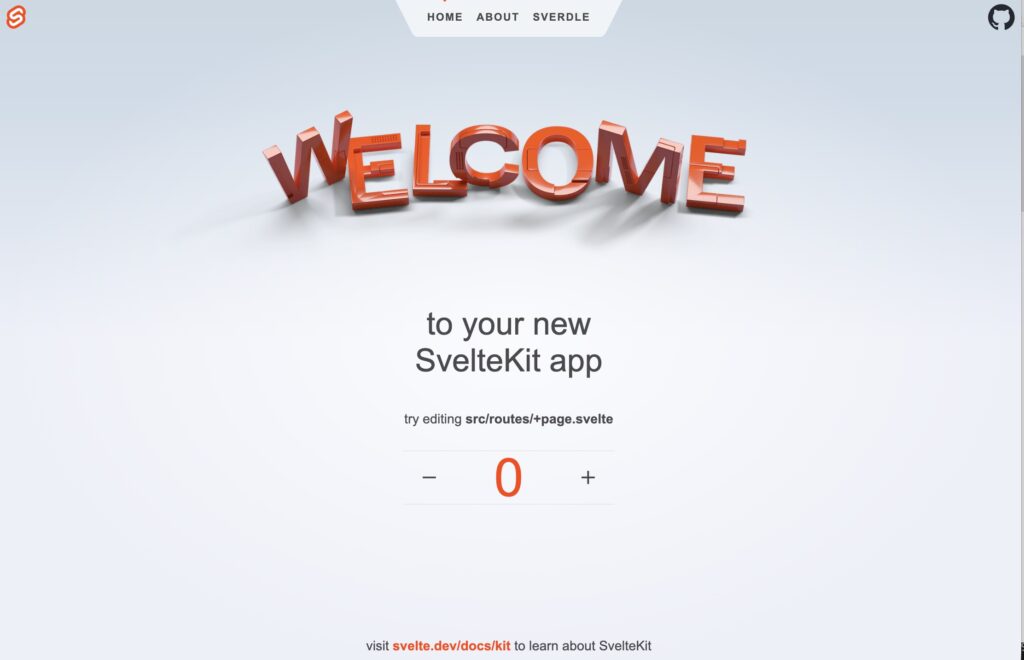
以下のようなページが表示される。
ーボタン、+ボタンを押して数字が増減するのが確認できる。
ターミナルでq [enter]とタイプすれば、終了できる。